
Create a team blog
Watch a video about permissions and privacy Team blogs are quite useful when small groups of people wish to contribute to a single blog. Basically, one person initially creates the blog, then adds other people to it as members.
Team members can either be administrators or not. Administrators can edit all posts (not just their own), add and remove team members (and grant admin access), and modify the blog's settings and template. Non-admins can only create and edit their own posts.
Here's how to add members to your blog:
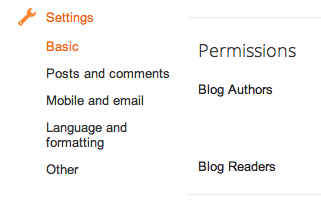
First, find the "Permissions" section under Settings | Basic.
 Then click Add Authors: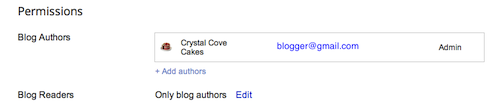
Next, type the email addresses of the people you're inviting to the blog, separating each address with a comma. They'll receive an email with a confirmation link soon. Note that they must have Google Accounts, and if they don't already, they'll be prompted to create one.
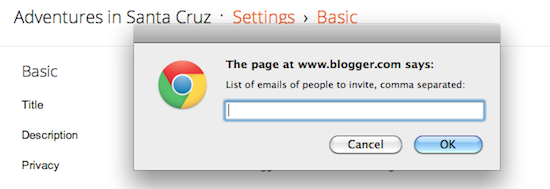
When you're ready to send the invitations, click OK.
Related Articles:
Using our upgraded interface
Watch our videos
Welcome to Blogger's new look
How to publish a blog post
How to create and edit pages
Manage comments on your blog
Import and export your blog
How to publish a blog post
How to create and edit pages
Manage comments on your blog
Import and export your blog
Dashboard
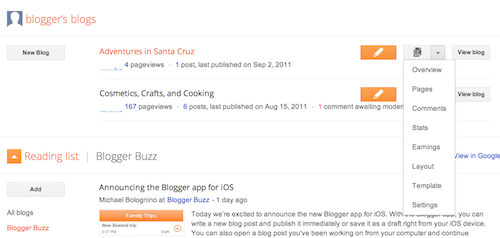
Your Dashboard, as always, is your starting point. This is where all your blogs are listed, and you can click on the icons next to them to perform various actions on each blog, such as:
- Writing a new post: Just click on the orange Pencil icon on your Dashboard to access the Post Editor.
- Viewing your posts: The gray Post List icon will take you to a list of your published and drafted posts for a specific blog.
- Catching up on your favorite blogs: Below the list of your own blogs, you’ll see a list of the blogs you follow with an excerpt from their latest posts.
- Everything else: Check out the drop-down menu next to the Post List icon for a quick link to:
- Overview
- Posts
- Pages
- Comments
- Stats
- Earnings
- Layout
- Template
- Settings

No comments:
Post a Comment